Quest Island

Maths and English practice they'll actually do.

From first sums to senior calculus, Quest Island turns Years 1 to 12 Maths and English into short quests with rewards, streaks and bosses to beat. And when they get something wrong, it shows them how to get it right.

Works in the browser on iPad, tablets, phones and computers. Nothing to download.

The Quest Island map screen showing islands for each Maths topic, a daily challenge and a puppy companion

The right fit for their age

Pick your child's year and the questions, topics and help change to match. Here's what that looks like at each stage.

Years 1 to 4

First steps

Big buttons, pictures and a read-aloud button on every question, so early readers can play on their own. Quests are eight questions, perfect for little attention spans, and the pet and sticker album keep them coming back.

They practise: counting and place value, adding and grouping, telling the time, money, 2D and 3D shapes, phonics and sight words, spelling and short stories with questions.

A Year 2 question asking what time an analogue clock shows, with four big answer buttons
Year 2: reading an analogue clock

Years 5 to 8

Building confidence

This is where Maths gets abstract and a lot of kids start to lose confidence. Every wrong answer comes with the working shown step by step, and Quest Island spots common slips, like an answer ten times too big, so they fix the idea rather than just the question.

They practise: fractions, decimals and percentages, ratio and rates, negative numbers, early algebra, area and volume, probability, grammar and punctuation, figurative language and reading comprehension.

A Year 7 algebra question, if x equals 8 what is 3x plus 2, with the working shown step by step after a wrong answer
Year 7: substitution, with the working shown

Years 9 to 12

Senior and exam prep

Quick, focused practice before a test or exam. Years 11 and 12 follow the Queensland senior Maths subjects, and students pick theirs. Worked solutions take them through calculus, trig and finance one step at a time, and calmer themes like Midnight and Galaxy can be unlocked if the bright island isn't their style.

They practise: quadratics, surds and indices, trigonometry, functions and graphs, calculus, vectors, matrices and complex numbers (Specialist), interest, loans and data (General and Essential), plus language analysis and essay skills in English.

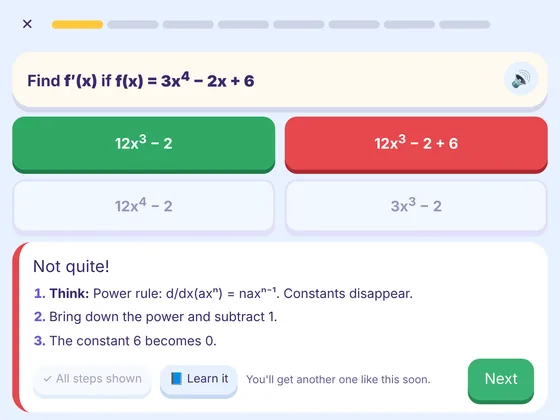
A Year 11 Mathematical Methods question on differentiating 3x to the fourth minus 2x plus 6, with the power rule explained step by step
Year 11 Mathematical Methods: differentiation

Short quests, real motivation

Every topic is a quest on an island. A quest is about eight questions, so a good session takes ten minutes, not an hour. Younger kids love the pet and stickers. Older students tend to chase the streaks, the bosses and the mastery bars filling up.

  • Islands for every topicPlace value, fractions, spelling, grammar, reading and more. Win crystals, then take on the island's boss.
  • A pet to look afterIt gets happier as they learn and misses them when they skip a day.
  • Coins, stickers and a daily spinSpend coins on outfits, themes and pet treats. Fill a sticker album. Spin once a day.
  • Lightning rounds and arcade gamesBeat-the-clock rounds and four learning mini-games that get harder with each year level.
  • Real rewards you chooseSet things like screen time or picking dinner. Kids save coins and ask, you approve.
The pet screen with a happy puppy, a happiness meter and treats to feed it
A wrong answer of 600 instead of 60, with feedback explaining the answer is 10 times too big and showing the working step by step Names the slip: "your answer is 10 times too big" Then walks through the working, one step at a time

Getting it wrong is where the learning happens

Most practice apps just say "incorrect" and move on. Quest Island works out what went wrong and teaches the idea, the way a good tutor would.

What happened

It spots common slips, like digits swapped, an answer 10 times too big or the wrong sign, and says so in plain words.

Show me how

The working is revealed one step at a time, so kids think before they see the answer.

Learn it cards

Every skill has a short lesson and a worked example, offered the first time they try it.

Reading proof

After each reading question, the sentence that proves the answer is highlighted in the story.

A Let's look at this together card with a quick reminder about place value and a button to try an easier one
Two misses in a row? It pauses, gives a quick reminder, switches to easier questions and builds back up.
A Learn it card about decimals with a worked example revealed step by step
Lessons on tap. Kids can open the lesson for any skill, any time, including in the middle of a quest.

One app from Year 1 to Year 12

Pick your child's year and the islands change to match. Change it any time if they need a step back or a stretch.

Years 1 to 10

Maths and English skills built around the Australian Curriculum (version 9), as taught in Queensland schools. Each skill shows its curriculum code.

Senior Maths

Years 11 and 12 follow the Queensland senior subjects: Essential, General, Mathematical Methods and Specialist Mathematics. Students pick theirs.

Senior English

Skill drills for the tricky parts: analysing language and devices, evidence, essay structure and vocabulary.

Set up in two minutes

A grown-up does the setup, then hands it over. Kids never need an email address.

  1. Open Quest Island and enter your emailWe send a 6-digit code. No passwords to remember.
  2. Choose a parent PINIt keeps the Parent Zone and reward approvals for grown-ups.
  3. Add each childA first name or nickname, their year, an avatar and a pet.
  4. Hand it overProgress syncs to every device you sign in on.

Rather not make an account? Choose "Just use this device" and everything stays on that device.

An island's quest list with skills, star ratings, Learn buttons and a locked boss

Know exactly where they need you

  • The Parent ZoneAccuracy, time spent, streaks, the last 14 days and every skill at a glance.
  • "Needs your help" listSkills they keep missing or got stuck on, each with a button to open the lesson and go through it together.
  • A weekly email on Sunday morningHow each child went this week and anything worth five minutes of your time.
  • A heads-up when they're stuckAn email when they hit a wall on something, so you can step in while it's fresh.
  • Siblings welcomeUp to 12 players per family, each on their own year, with a friendly family leaderboard.
The Parent Zone showing a Needs your help panel and an overview of level, questions, accuracy and time

Kid-safe by design

No ads, no tracking, no chat with strangers and nothing sold or shared. We only keep what the game needs: your email, each child's nickname and their progress. You can download or delete it all from the Parent Zone at any time. Read the privacy page.

Questions parents ask

Is it really free?

Yes. There are no ads, subscriptions or in-app purchases. The coins in the game are earned by learning, never bought.

Isn't it a bit young for a teenager?

The look is playful, but the content isn't. Years 9 to 12 get senior-level questions with full worked solutions, and Years 11 and 12 follow the Queensland senior Maths subjects. Students can unlock calmer themes, and plenty of teens like a quick ten-minute quest before a test more than a textbook.

What devices does it work on?

Anything with a modern web browser: iPad, Android tablets, phones, Chromebooks, Windows and Mac. On an iPad, tap Share then "Add to Home Screen" and it opens like an app.

How much should my child use it?

Ten minutes a day is plenty. Quests are short on purpose, and the daily challenge and streak reward little and often over long sessions.

Does it follow what they're learning at school?

Years 1 to 10 are built around the Australian Curriculum (version 9) used in Queensland schools, and Years 11 and 12 follow the Queensland senior Maths subjects. It's a practice companion, not a replacement for school, so use the year setting to match where your child is at.

Can my kids use it on more than one device?

Yes. Sign in with the same parent email on each device and progress syncs between them.

Does it need the internet?

It needs a connection to load and to sync, but quests keep working if the Wi-Fi drops for a bit.

Who made it?

Quest Island was made in Brisbane by a parent who wanted his daughter to enjoy Maths and English practice, and to get real help when she got stuck.

Ready to set sail?

Free for every year from 1 to 12. Two minutes to set up, and the first quest is waiting.

Start for free